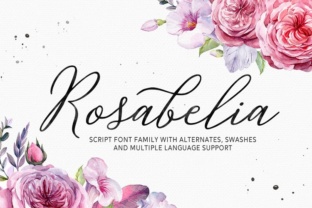
Rosabelia: A Script Font for Creative Web Design
As a web designer, I’m always on the lookout for fonts that bring both personality and professionalism to a site. Rosabelia, a modern script font from the Script Amp collection, has quickly become one of my go-to choices for adding a touch of elegance and casual charm to digital projects.
First Impressions in a Hero Section
I first tested Rosabelia in a hero section for a boutique online store. The font’s fluid curves and subtle swashes gave the headline a handcrafted feel that felt both refined and approachable. It paired beautifully with a clean sans serif for the supporting text, creating a visual balance that kept the design from feeling too ornate.
The font’s stylistic alternates and ligatures added a layer of customization that made it easy to fine-tune the look without overcomplicating things. Whether I was adjusting the flow of a name or tweaking a tagline, Rosabelia offered flexibility that made it feel like a natural part of the design process.
Responsive Design and Mobile Usability
One of the first concerns when using a script font is how it performs on smaller screens. Rosabelia handled mobile layouts well, maintaining legibility even at smaller sizes. On a phone, the font didn’t feel cramped or hard to read, which is a big plus for websites that rely on mobile traffic.
When placed over an image banner, the font stood out without overwhelming the background. Its weight and spacing allowed it to breathe, making it ideal for call-to-action buttons or featured headlines. I found that pairing it with a dark background helped the text pop, while a light background softened its presence just enough to keep it from competing with other elements.
Webfont Performance and Loading Speed
From a technical standpoint, Rosabelia’s webfont files were optimized for fast loading. Even with multiple weights, the font didn’t add unnecessary bloat to the site. This is especially important for designers who want to maintain a smooth user experience without sacrificing visual flair.
I also checked the font’s multilingual support, and it handled common characters and diacritics without issue. That makes it a solid choice for international sites or projects that require a broader language scope.
Font Pairing for Digital Branding
While Rosabelia shines as a display font, it works best when paired with simpler typefaces. For example, using it alongside a basic sans serif for body copy creates a clear visual hierarchy that guides the reader through the content. This combination is perfect for landing pages, portfolio sites, or course sales pages where clarity and style need to coexist.
For more editorial-style designs, I’ve experimented with pairing Rosabelia with a soft serif font. The result was a warm, inviting aesthetic that felt both modern and timeless. It’s a great option for blogs, personal websites, or creative portfolios looking to make a statement without being too flashy.
Limitations and Best Practices
Like any decorative font, Rosabelia isn’t suited for every use case. Long paragraphs of text, small navigation menus, or form labels are not ideal applications. The font’s intricate details can become difficult to read when scaled down or used in dense layouts.
That said, when used intentionally—such as for headings, logos, or decorative accents—it brings a level of sophistication that can elevate a website’s overall look. I recommend testing it across different screen sizes and backgrounds to see how it performs in your specific context.
Final Thoughts on Rosabelia
Rosabelia is more than just a pretty font—it’s a tool that can help shape the tone and identity of a website. Whether you’re designing a creative portfolio, a product landing page, or a brand’s digital presence, this script font offers a unique blend of elegance and versatility.
With its rich set of stylistic options and strong performance in web environments, Rosabelia is a smart choice for designers looking to add character to their digital projects. Just remember to use it wisely, and you’ll find it becomes an essential part of your design toolkit.